ASC — Document Ambulatory Surgery Case Procedures
Note
The following describes an opt-in feature for practices that have ambulatory surgery centers (ASCs). To enable this feature for your organization, contact your CSM. For more information, see ASC Setup: Enable ASC Features.
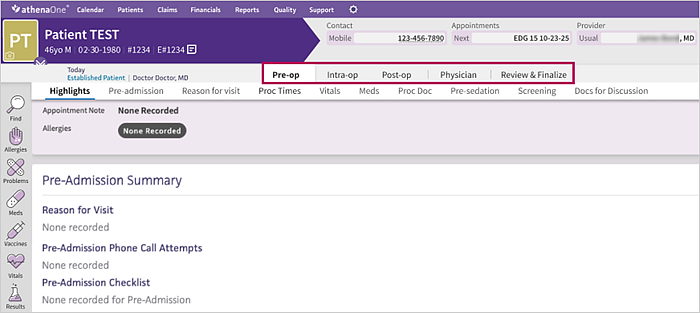
In the ASC encounter layout, you and other members of your surgical team can document key aspects of a procedure at each stage. Within the layout, the stages to document an ASC surgical case are Pre-Op, Intra-Op, Post-Op, Physician, and Review & Finalize.
Note
The documentation steps for a surgical case do not include the Intake stage.
Review the following for an overview of layout features and step-by-step workflow instructions.
Document a surgical procedure
- In an encounter to which the Surgical Case layout has been assigned,
click Go to Procedure:
The steps for the new documentation workflow appear. In any step, you can click the patient banner to return to chart.
Note
You can also click Procedure in the case briefing summary to access this section.
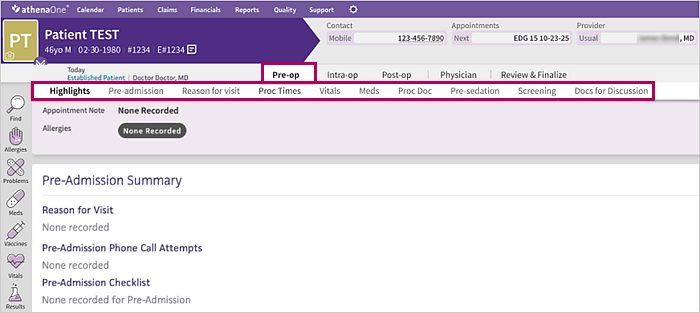
- Pre-Op — The pre-op nurse documents and signs the relevant sections of the case. Click the stage at the top of the page to view its associated sections, then click a section to go directly to it.
Note
For steps 2 through 5, the nurse or physician can sign a section in a stage or remove a signature from a section. - Intra-Op — The circulating nurse documents and signs the relevant sections of the case.
- Post-Op — The PACU nurse documents and signs the relevant sections of the case.
- Physician — The physician documents and signs the sections that are relevant to the case.
- Review & Finalize — Clinical and administrative staff review and complete the documentation recorded in the surgical case before closing it. The Case Summary option shows what was documented for the procedure along with who signed each section and when.

Navigate the surgical case menu
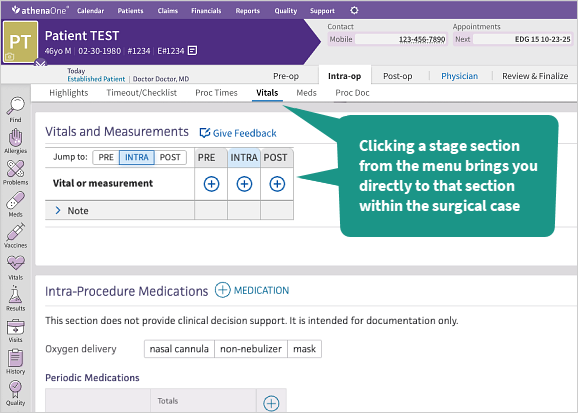
At the top of the page, click a surgical case stage to view its associated sections.
Click a section in the menu to go directly to that section within the surgical case.
Note
Each stage menu lists Highlights as its first section. Click Highlights to go to the Procedure Highlights banner at the top of the page.
On a small screen, part of the section menu may be hidden. Click the next icon at the right end of the menu to view the remaining sections.
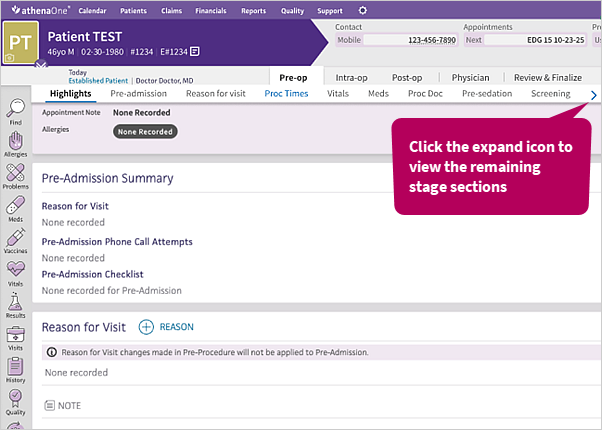
Click the previous icon at the left end of the menu to view the first sections again.

Surgical Case layout features
Sections within the Surgical Case encounter layout include features to view prior activity, sign for a section, reopen and edit a signed section, or remove a signature. The layout also supports multi-user updates and 24-hour time displays.
Last modified by
After a nurse or provider updates a section, athenaOne shows who modified the section last and when.

This information appears in all sections that can be signed.
Sign for a section
An option to sign appears at the section level. Click to sign.

You can also sign a blank section that does not need to be documented.
After a nurse or doctor signs a section, Signed by shows who signed the section and when.

Edit a signed section
Any user can make a change in a section that has already been signed. When a user modifies a previously signed section, this automatically removes the signed status. After updating, click Sign again to sign for the section.
Remove a signature from a section
To remove your signature from a section you previously signed, click Signed by.

Data refreshes for multi-user support
To support a multi-user workflow, athenaOne loads the latest changes only for users who are actively documenting a step in the case. For example, if a staff member reviews sections without making any changes, the latest information does not refresh as the nurse or physician enters it.
The Surgical Case layout and configured content
If your practice currently uses any of the following structured procedure layouts, you will see the same content in your procedure sections when you use the Surgical Case layout:
- Structured Procedure Visit
- Exam-only Structured Procedure Visit
- OB Structured Procedure Visit
- OB Exam-only Structured Procedure Visit