ASC — Surgical Case Management: Link Chart Documents and Clinical Orders to the Surgical Case
Note
The following describes an opt-in feature for practices that have ambulatory surgery centers (ASCs). To enable this feature for your organization, contact your CSM. For more information, see ASC Setup: Enable ASC Features.
You can link signed surgical and procedure clinical orders to a patient’s surgical case. Once linked, the order and its related documents appear in the surgical case summary, Procedure Highlights Banner, Visits and Cases, and Surgical & Procedure History and updates when the case is amended.
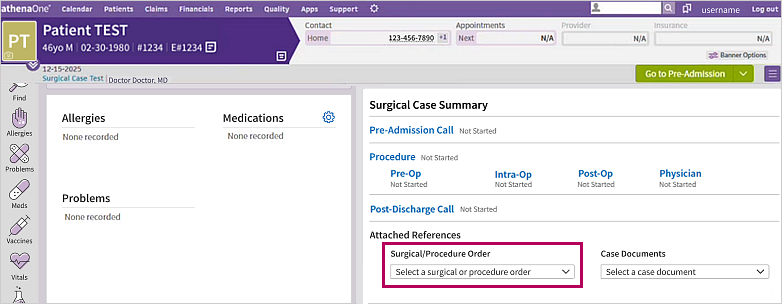
In the Select a surgical or procedure order drop-down menu, you can view:
-
The name of the order
-
When the orders were last updated (with the most recent appearing on top and the oldest at the bottom)
-
If it's a surgical (SURG) or procedure (PROC) order
-
The five most recent orders (if a patient has more than five orders to choose from, you can click See more at the bottom of the drop-down menu to view all orders)
Note
Orders must be signed in order to appear in the Select a surgical or procedure order drop-down menu.
How this works
 Status icons
You can view the following status icons next to each encounter of the surgical case:
| Icon | Description |
|---|---|

|
Documentation has begun somewhere in the case, but the specific encounter has not yet been started. |

|
Encounter has been modified and is in progress |

|
Encounter is signed and closed |
The following status icons appear next to the Pre, Intra, Post, and Physician stages of the surgical case:
| Icon | Description |
|---|---|

|
Not started |

|
Modified |

|
Completed and signed off |
Administrators can reference the surgical case summary to quickly view which tasks are complete and which still need to be done without opening the surgical case.
Procedure Highlights Banner
You can also view the linked surgical or procedure order and the attached documents in the Procedure Highlights Banner.
Changes made to the linked surgical or procedure order are automatically reflected in the Procedure Highlights Banner without you needing to refresh the page. You can click the linked surgical or procedure order to view the order and its associated documents.
Attached References
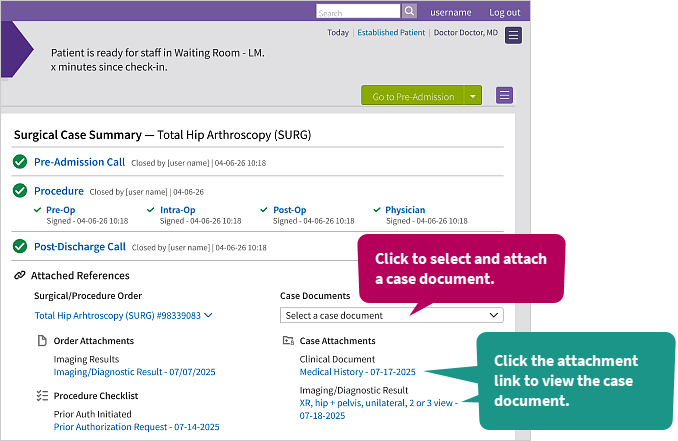
The Attached References section displays documents tied to the case:
-
Case documents: Case documents you've attached appear under Case Documents in the Case Attachments sub-section. Click a case attachment's link to view its document.
-
Other documents: Documents associated with the order (surgical clearance, surgical consent, insurance-related approvals, and so on) appear under Attached References. Click any document link to view it.
Note
Orders without attached documents won't have any content under the Attached References section.
Visits and Cases
You can view the linked order in the Visits and Cases section on the Visits tab  of the patient chart. Click the order link under the surgical case to view the order.
You can also view attached case documents by clicking the down arrow  next to Case Documents and clicking any of the listed links.
If there are more than four case documents attached, athenaOne displays a Show More link at the bottom of the Case Documents section. Click Show More to view all attached case documents.
Surgical & Procedure History
Once the surgical case is closed, athenaOne adds the surgical procedure's information, with its completed date, to the Surgical & Procedure History section of the History tab  .
.
Physician operative note
The physician operative note contains a summary of the procedures conducted by the physician in the Physician stage of the surgical case. It includes information recorded in:
-
Procedure documentation
-
Procedure outcomes
-
Assessment & Plan
-
History & Physical
To view it, go to the Surgical & Procedure History section of the History tab and click the view-more icon  next to the order.
You can also access the physician operative note on the Find tab  of the patient chart.
Note
If you amend a surgical case (for example, editing the case's procedure documentation), the operative note automatically reflects those changes once you save the amendment and close the encounter.
Completed, deleted, and reopened orders
-
Completed: When the procedure is completed and signed off, athenaOne marks the linked order as CLOSED and attaches the physician operative note to the order. If an order is marked Complete or Done, it remains linked to the surgical case.
-
Deleted: If you delete an order that's linked to a surgical case, athenaOne removes the order and its associated documents from the case. Deleted orders do not appear in the Select a surgical or procedure order drop-down menu.
-
Reopened: Reopened orders remain linked to the surgical case. Only deleted orders no longer stay linked.
Step-by-step instructions
Link an order to a surgical case
-
On the patient briefing, in the Surgical Case Summary section, click the Select a surgical or procedure order drop-down menu.
-
Select the order you want to link to the surgical case.
Once linked:
-
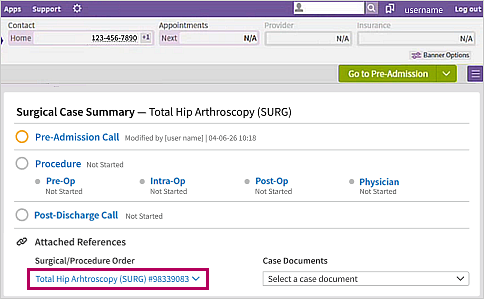
The Select a surgical or procedure order drop-down menu changes to the name of the linked order. Click the order link to view the order.
-
The name of the linked order also appears next to the Surgical Case Summary section title. athenaOne truncates long order names in the section title and drop-down menu if needed. Hover your cursor over the truncated name to view the full order name.
-
A success message appears in the bottom left corner of the screen.
-
Change a linked order
If you linked the wrong order or want to swap it for another:
-
Click the down arrow
 next to the order link.
 -
Select Change order.
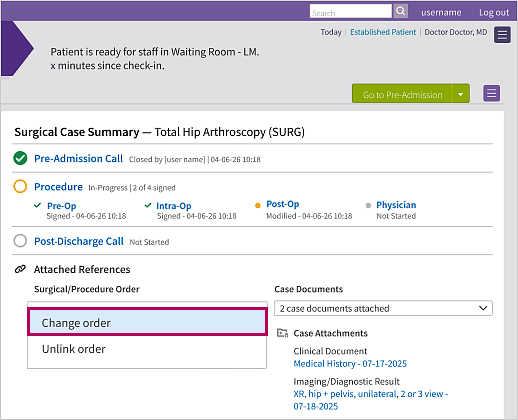
athenaOne displays the other orders associated with the surgical case in the drop-down menu. -
Select one of the other orders.
The drop-down menu changes to the order you just selected, and its associated documents appear under Attached References.
Unlink an order
If you linked an order by mistake:
-
Click the down arrow
next to the order link. -
Select Unlink order.
athenaOne removes the order from the drop-down menu name and reverts to Select a surgical or procedure order. The order remains accessible as an option in the drop-down menu.
Attach a case document
You can attach case documents to a surgical case directly, without linking an order first. This is a useful solution if your organization is configured for multiple contexts or multiple chart groups.
-
In the Attached References section, under Case Documents, click the Select a case document drop-down menu.
-
Select the case document you want to attach.
The attached document appears under Case Documents in the Case Attachments sub-section. Click its link to view the document.
Attach more documents to an order
-
At the bottom of the order window, click VIEW ACTIONS.
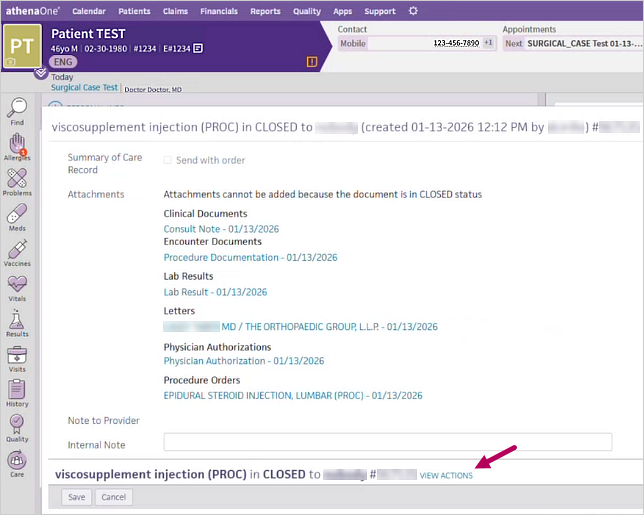
Actions such as Delete, Reopen, and Leave in CLOSED appear. -
Select the Reopen radio button.
-
Click Save.
The order becomes editable. -
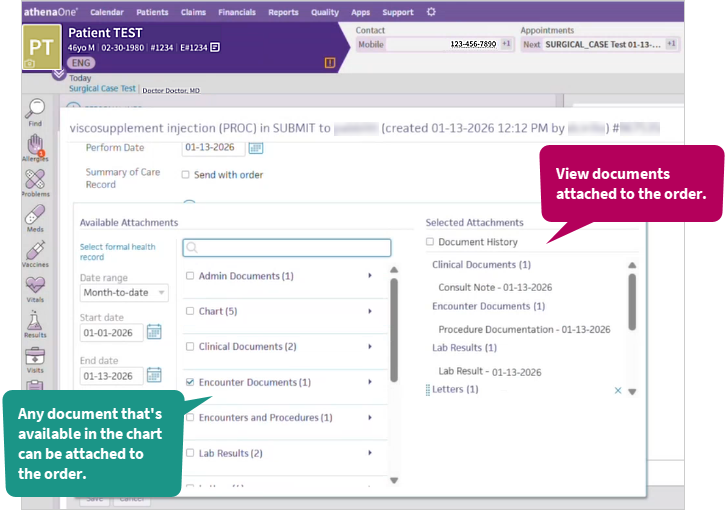
In the Attachments section, click the add icon
 next to ATTACHMENTS.
The Available Attachments window appears.
-
Attach additional documents or remove attached documents as needed.
-
Click Save at the bottom of the window.