Custom Insurance Grouping
This page allows you to assign (or unassign) an insurance package with a custom insurance group. You must first define the custom insurance group name using the Custom Insurance Group Names page.
 How do I get to this page?
On the Main Menu, click Settings  >Billing. In the left menu, under Practice Links — Insurance Packages, click Custom
Insurance Grouping
>Billing. In the left menu, under Practice Links — Insurance Packages, click Custom
Insurance Grouping
Step-by-step instructions
To assign or remove an insurance group or insurance package to and from a custom insurance
group
- Display the Custom Insurance Grouping page: On the Main Menu, click Settings >Billing. In the left menu, under Practice Links — Insurance Packages, click Custom
Insurance Grouping.
- Locate the default insurance group that you want in the list on the left side of the page.
- If you want to associate an individual insurance package, click the drilldown link. The list of insurance packages for this insurance group appears. (Skip this step if you want to associate the insurance group as a whole.)
- Locate the custom insurance group in the columns across the top of the page.
- Click the option button for the (insurance package/default insurance group) and column (custom insurance group). To unassign the package or group, click the (Don't Include) option button located to the far right on the same row.
- Click Save.
Note: If you mix the custom reporting categories — that is, assign insurance packages within one default insurance group to different custom insurance groups — the disabled Mixed checkbox (to the far right of the athenahealth-defined reporting category) is automatically checked.
To "uncheck" an option button, click the (Don't Include) option button located to the far right on the same row.
To view
a list of insurance packages/view insurance package details
- Display the Custom Insurance Grouping page: On the Main Menu, click Settings >Billing. In the left menu, under Practice Links — Insurance Packages, click Custom
Insurance Grouping.
- Select the insurance category of the package that you want to view. A list of insurance packages in the selected category appears.
- Locate the insurance package that you want to view in the list.
- Click the view link. The insurance package details appear.
To view Audit History for a Custom Insurance Grouping
- Display the Custom Insurance Grouping page: On the Main Menu, click Settings >Billing. In the left menu, under Practice Links — Insurance Packages, click Custom
Insurance Grouping.
-
Click the drilldown link next to a specific default insurance group. The list of insurance packages for this insurance group appears.
-
Click the Audit History link to view creation, deletion, and modification events for this Custom Insurance Grouping.
Tip: If no changes have been made to a Custom Insurance Grouping, the Audit History link does not appear on the page.
The Audit History includes the following details for each change made:
-
athenaOne username who made the change
-
Date/time/timezone when the change was made
-
Details about what was changed, including field and value
Note: Due to a system limitation, a change is recorded as a set of delete/undelete/create events: delete previous value > undelete > create new value
Example
In this example:
A user assigned an insurance package to BCBS and then changed it to MEDICARE.
The first selection is recorded as: "Created with" BCBS.
When the selection is changed, the change is recorded as:
"Deleted" BCBS > "Undeleted" > "Created with " MEDICARE
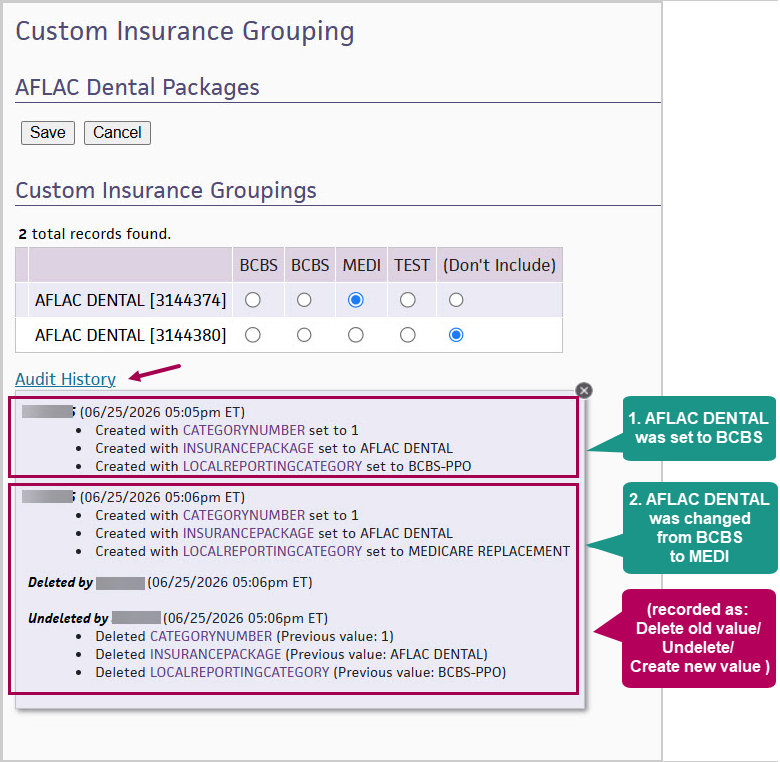
Tip: Click the image to see an expanded view.
Features and workflows
Important: When athenahealth adds a new insurance package to our national database, the new insurance package is not automatically added to any of the custom insurance groupings that you create. Therefore, athenahealth strongly recommends that you maintain your custom insurance groupings on a regular basis. If you do not, your categories may appear to be "mixed."
To request changes to insurance packages, please contact the CSC from athenaOne > Support > Success Community > Contact Client Support Center.
The custom insurance grouping is a one-to-one relationship: an insurance group or package can be associated with only one custom insurance group.
The custom insurance groups defined by your practice are listed across the top of the page. The predefined athenahealth insurance groups are listed on the left-hand side of the page, with a drilldown link for each category. You can click the drilldown link to display a list of individual insurance packages that may be assigned to the group.
You can report on these categories using the Insurance reporting category and Use custom insurance groupings menus in the Advanced view of the A/R Aging and Activity Report wizards.
Field Reference
| Column Headings on Custom Insurance Groupings List | |
|---|---|
|
|
The list of default insurance categories maintained by athenahealth. |
| (multiple) |
First four letters of custom insurance group names. You can pause your cursor over the letters to reveal the complete name. |
| (Don't Include) |
(option button checked) at the far right indicates that the default insurance group or insurance package is not currently assigned to any custom group. |
| Mixed |
(option button checked) indicates that individual insurance packages within the default insurance group have been assigned to different custom insurance groups. (Always disabled. The system updates this option automatically.) |