 Quick Reference — To enter therapy orders
athenaOne for Hospitals & Health Systems
You must be logged in to a department that uses athenaOne for Hospitals & Health Systems
Therapy order types include: Occupational Therapy, Physical Therapy, Respiratory Therapy, and Speech Therapy. Physicians and nurses can enter orders for hospital patients in Pre-admission, Admission in progress, Admitted, and Discharge in progress statuses.
- Display the patient's Order Entry page: In the patient chart, click the arrow in the green workflow menu (at the upper right) and select Go to Orders. (The options available in the green workflow menu depend on your user role.)
- Click the plus icon
 next to Order Entry to display the search tool.
 - Search for and select the type of therapy order you need. (Therapy order types include Occupational Therapy, Physical Therapy, Respiratory Therapy, and Speech Therapy.)
- Click the new order form to expand the details.
Note: The available detail fields may vary with the order type. - Ordering provider — Select the ordering provider, and then use the menu to the right to select how the order was given (verbal, phone, written, etc.).
- Priority — Select the priority for this order:
- STAT: urgency to administer order.
- now: intended to be given within the next 30 minutes.
- routine: based on routine for that frequency in the facility, for example, twice a day.
- schedule - start first order by specific time.
- Intensity — Select the level of intensity.
- Frequency — Select from the available frequency options (for example, every other day).
- PRN — Select this option for orders that will be administered as needed.
Note: If PRN is selected, enter additional instructions in the Notes field. - Duration — Select the duration for the therapy.
- Note — Enter any relevant notes for the order. For example, include additional information for the respiratory therapist such as the diagnosis or reason for the order.
Signing orders
Note: Orders can be entered by a nurse, but must be signed by a physician, according to hospital and legal guidelines.
- To sign all orders for this patient, scroll to the top of the page and check Select all.
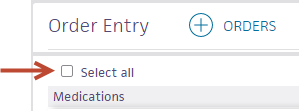
- To sign only selected orders, check the box for each order to sign.
- Click Sign Orders.