 Quick Reference — To edit CPT codes for authorization denials
athenaCollector + athenaClinicals
athenaOne for Hospitals & Health Systems
You can use this procedure to indicate that you reviewed authorization tasks that were denied. The task is still listed as Not complete.
- Display the Authorization Tracker page: On the Main Menu, click Patients > (Care Coordination) Authorization Tracker.
Set the filter criteria
- At the top of the page, click Change filters to display the filter fields.
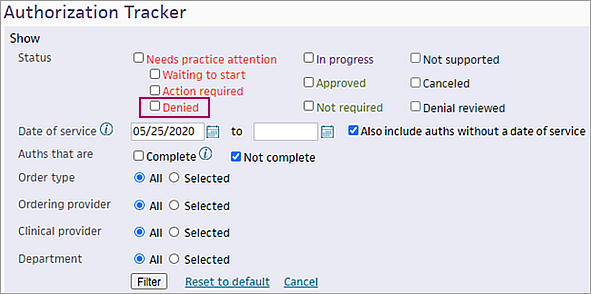
- Status — Select Denied (under Needs practice attention).
- Set other filters (for example, Order type or Clinical provider), as needed.
- Click Filter to generate the list of denied authorizations.
Display the task
- Click go to task.
The order document appears with the authorization status displayed at the top.
- Click View details to open the Authorization needs practice attention window.
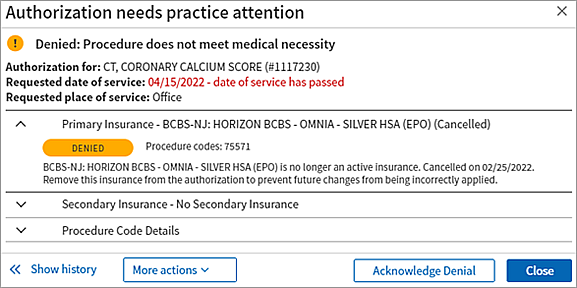
- To indicate that you reviewed the denied authorization task, click the Acknowledge Denial button.
athenaOne updates the task status to Denial reviewed and removes the task from the Needs practice attention list.
Note: To locate this authorization task on the Authorization Tracker, select the Denial reviewed option in the filter window. - If you want to edit or resubmit the authorization, click More actions at the top of the order document (or click the More actions menu in the Authorization needs practice attention window) and select an option.
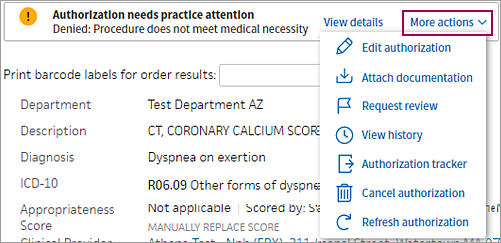
- To return to the Authorization Tracker, select Authorization tracker from the More actions menu.