Embedded OB Workflow
Calculate the Estimated Delivery Date
To calculate the estimated delivery date, access the EDD Calculation section near the top of the OB Worksheet, beneath Prenatal Visits.
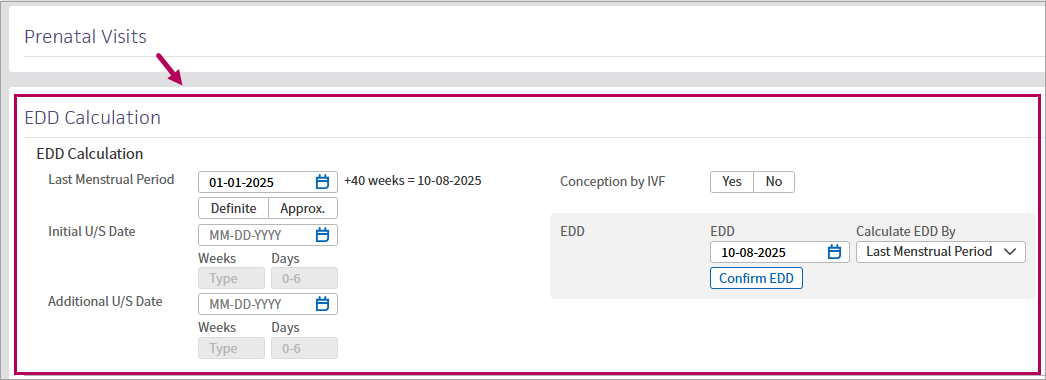
Enter the date of the patient's last menstrual period, ultrasound dates, and select whether the conception was via IVF.
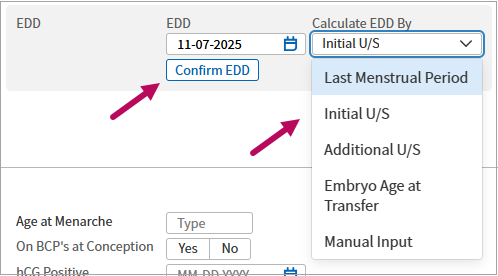
In Calculate EDD by, select the information to use when calculating the estimated delivery date. Click Confirm EDD to commit the calculation.
Note
By default, the system uses the date of the patient's last menstrual period to auto-populate the date in the EDD field if this information is documented.
 EDD calculation options
| Option | Description |
|---|---|
| Additional U/S | Uses the date in the Additional U/S field—the most recent ultrasound date recorded—to calculate the EDD. |
| Embryo Age at Transfer | If you select Yes for Conception by IVF, enter the embryo age at transfer, and select this option, the system uses the embryo age to calculate the EDD. If you select No for Conception by IVF and have this option selected, the system defaults back to Last Menstrual Period to calculate the EDD. Note: If you select Yes for Conception by IVF, enter IVF information, but then select No, the IVF information you previously entered is not retained. |
| Initial U/S | Uses the date in the Initial U/S field—the initial ultrasound date—to calculate the EDD. |
| Last Menstrual Period | Default setting. Uses the date entered in the Last Menstrual Period field to calculate the EDD. |
| Manual Input | Select to use a date that you manually enter in the EDD field. Note: If you manually enter a date in the EDD field, this option automatically appears in Calculate EDD by. |
Record IVF information
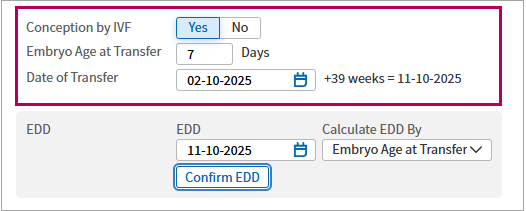
Select options to indicate whether your patient has an IVF pregnancy. The option you select may impact the patient's EDD calculation.
In the new Conception by IVF section, select Yes for an IVF conception. Other wise, select No.
If Yes, fields appear for you to enter the Embryo Age at Transfer in days, and the Date of Transfer.
Check EDD history
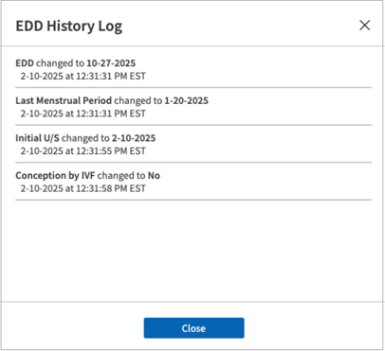
Click EDD History Log to check for changes made to a patient's EDD information.
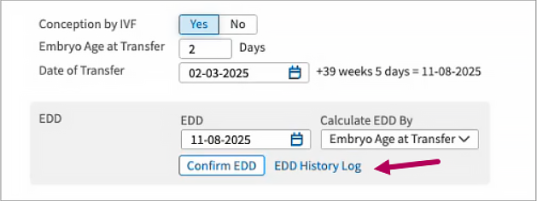
If any provider or member of staff changes the information in EDD Calculation, this change appears in the log.
EDD and gestational age in the Patient Banner
When you update the EDD field, the patient’s banner automatically updates to display the new estimated delivery date and gestational age.
-
The banner automatically calculates the gestational age based on the EDD selected.
-
If the EDD is adjusted later in the patient’s course, the banner will update to reflect the new EDD and gestational age.
