Embedded OB Workflow
Labs
The tests commonly ordered for patients appear in the Labs table within the OB Worksheet, with test results appearing once mapped.
What's new
For the latest advancements in OB Worksheet labs, see Automated Lab Result Mapping. This enhancement includes two reports to identify gaps in lab result mapping.
-
OB Lab Mapping Accuracy Report: This report lists the number of results that were accurately mapped by athenaOne's automation, broken out by result type. To run the report: Click Reports > Report Library and select the Clinicals tab. Scroll down to OB Lab Mapping Accuracy Report and click Run.
-
OB Lab Results Admin Mapping Suggestions: This report shows a list of manually mapped lab results not currently covered by athenaOne's automated mapping or the OB Lab Result Mapping admin page. Practice admins may choose to add these to the OB Lab Result Mapping admin page to address gaps in automation. To run the report: On the main menu, click Reports > Report Library and select the Clinicals tab. Scroll down to OB Lab Results Admin Mapping Suggestions and click Run.
Filter lab results
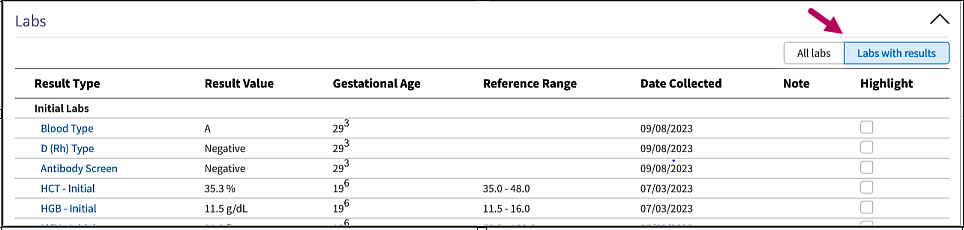
Select filters in this section to view all or only labs with mapped results.
Gestational Age column
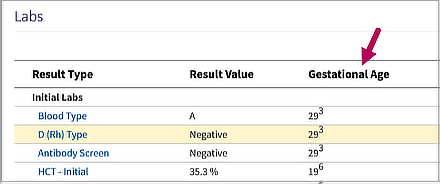
Review the Gestational Age column in Labs to see the number of weeks determined for a pregnancy. The number of days since the last full week appear in superscript to the right of the week value. athenaOne uses the Date Collected field on lab results to calculate this value.
Persistent row highlighting
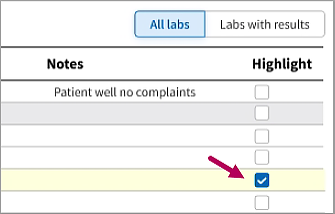
Select the check boxes in the Highlight column to give focus to results of interest. The row remains highlighted for you or other providers to reference.
-
Deselect the check box to remove highlighting.
-
The highlighting on each row syncs with the Highlight checkbox in the lab document, so you can highlight or remove highlighting from either the lab document or from the Labs section of the OB Worksheet.
 Related Topics