Behavioral Health
Measure Goals
You can make treatment plan goals measurable by defining how progress will be evaluated over time. Add key values, dates, and milestones to help track the patient's progress toward the goal. Once you begin measuring a clinical data point, you can visualize progress in a data chart.
Treatment plan goals support qualitative and quantitative measurements:
-
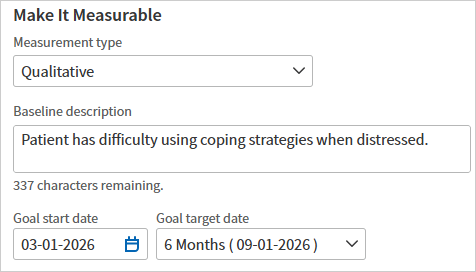
By default, goals are configured for qualitative measurements. You can record a baseline description, goal start date, and goal target date.
-
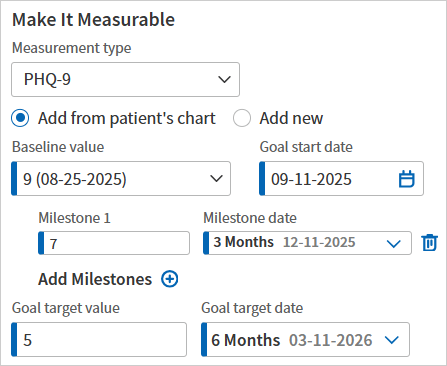
Alternatively, you can select a quantitative clinical measurement (for example, PHQ-9 or GAD-7 screening questionnaire scores) and record specific values to track the patient's progress over time, including the patient's baseline value, target value, and progress milestones.
Add a qualitative measurement
-
Add a new goal or edit an existing goal. Scroll down to the Make It Measurable section.
-
Measurement type — Select Qualitative.
-
Baseline description — Describe the patient's initial status with respect to the goal.
-
Goal start date — Enter or select a start date for the goal.
-
Goal target date — Select a preset or custom due date for the goal, or leave the default setting (No Target Date) selected.
-
Click Add.
Add a quantitative measurement
-
Add a new goal or edit an existing goal. Scroll down to the Make It Measurable section.
-
Measurement type — Select a clinical measurement type.
-
Select Add from patient's chart to populate the three most recent results as options in the Baseline value menu. To add data manually, click Add new.
Note: If there are multiple charts for one patient, athenaOne displays the three most recent results across all patient charts.
-
Baseline value — Select the patient's baseline value.
-
Goal start date — Enter or select a start date for the goal.
-
Goal target value — Enter or select the patient's target value.
-
Goal target date — Select a preset or custom due date for the goal, or leave the default setting (No Target Date) selected.
-
Add Milestones (optional) — Add one or more milestones to indicate incremental progress toward the goal's target value and date.
Visualize a patient's progress
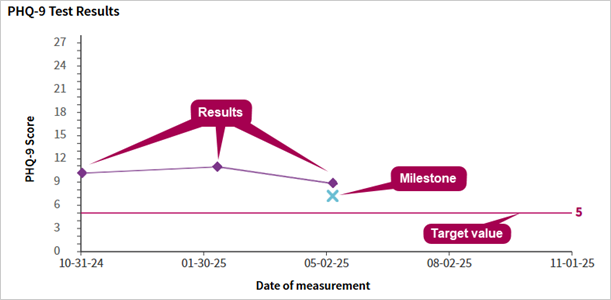
Once you begin measuring a clinical data point, you can visualize the patient's baseline value, target value, and milestones against recorded clinical data in the patient's chart.
In the expanded view of the goal, athenaOne displays the relevant data in a line chart, allowing you to see at a glance how the patient is trending towards achieving the goal. To view the chart, locate the goal and click Show More.
Add measurements within the encounter
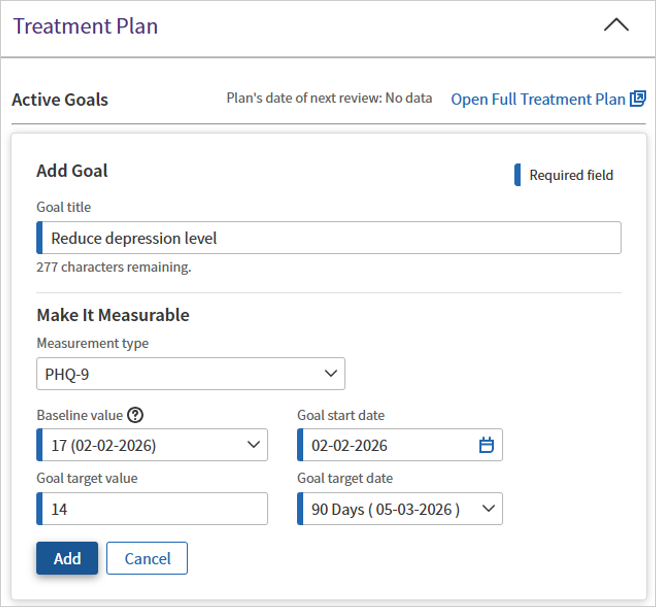
The Make It Measurable section is also accessible during behavioral health encounters.
Tip: Hover over the image to see an expanded view.
The encounter experience offers the same goal measurement features as the full treatment plan, with a couple key differences:
-
When selecting a baseline value, you can choose only from the patient's most recent results. To add new baseline data, you must open the full treatment plan.
-
Adding milestones to track progress over time is not available during an encounter.
You can view the patient's goal progress chart during the encounter, just as you can in the full treatment plan.