Quick Reference — To scan a check
As of November 2020, U.S. Bank (rather than Elavon) processes business and corporate e-checks after you scan them. Scanned checks are processed in one to seven days. For more information, see Processing business and corporate e-checks.
Note: Elavon still processes personal e-checks.
- Insert the check into the check scanner.
The fields are automatically populated, and an image of the check appears.
You can use the additional fields (for example, Driver's license number, Other identification) to record identifying information based on your practice's policy.
Note: Click Reset Scanner if a check becomes lodged in the scanner, or if you need to reset the scanner after a power outage. This action will clear the scanner, and you can then resume collecting check payments. - Enter the check amount in the Confirm Amount field. (Use the zoom in button if the check image is too small to read.)
This step verifies that the amount on the check matches the amount you entered in the Today's Payment field.
Note: This double entry system is important to ensure that the check amount is entered properly because checks cannot be voided like credit cards. If the amounts do not match, you receive a warning and are prohibited from proceeding until the discrepancy is resolved. - The receipt window appears with a message stating that the transaction was successful.
Tip: If you scanned a business or corporate e-check, print a receipt before you close the receipt window. Otherwise, you must wait until the check is processed before printing the receipt. - If the message states that the transaction was unsuccessful, follow the instructions in the message or request another form of payment.
 Processing e-checks
E-checks (electronic checks) are checks scanned at the practice level.
Payments can be made using business/corporate e-checks or personal e-checks.
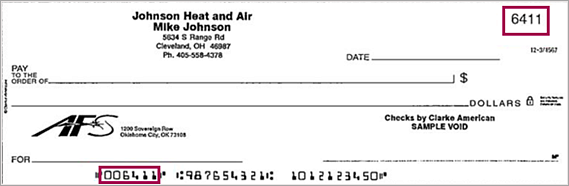
athenaOne determines the type of check based on reviewing the number in the top right corner and the numbers in the Magnetic Ink Character Recognition (MICR) line at the bottom, regardless of the check type selected in the Collect Payment page and who is paying (patient or payer).
Note: If the account number, check number, or routing number is missing (or invalid) on the check you are scanning, athenaOne displays a warning message and does not process the check.
If you do not want athenahealth to process your business/corporate e-checks, you can collect the payment at time of service, record in the patient activity page as "cash/other" and payment method: check, and not scan the check. This will get posted immediately and then the check can be deposited at a local bank.
| Business/Corporate e-check | Personal e-check | |
|
MICR line format
|
The number in the top right corner of the check matches the first set of numbers in the MICR line.
|
The number in the top right corner of the check matches the last set of numbers in the MICR line. (MICR line format: Routing# Account # Check# ) |
| Processor | athenahealth Financial Processing Services (FPS) team processes business and corporate e-checks with U.S. Bank. | Elavon |
| Processing time |
Scanned checks are processed in one to seven days.
Important: Please take the one-to-seven-day processing delay into account when planning for month-end reconciliation. |
One business day before 8 PM (EST) otherwise the next day. |
| View payment activity |
|
Payment is reflected automatically in E-payment activity page / patient activity page |