AI-Determined Copay Amount
Use the AI-determined Copay amount for improved accuracy of the Copay amount on the Check-in and Checkout pages, and patient-facing enhanced self check-in.
 Overview
Use AI-determined Copay amount for improved accuracy, which can help increase Time of Service collections, reduce refunds due to overcollection, and increase practice staff confidence in collecting copay.
- The AI-determined Copay amount removes the concept of "copay type" and improves the accuracy of the copay amount for all appointments. It determines Copay amount by evaluating the full appointment context in real time.
- The AI view appears by default only when the system has high confidence in the accuracy of the AI-determined Copay amount (that is, when the amount achieves a minimum precision threshold).
- To help with change management, you can still go back to the legacy (non-AI) view to see the legacy (non-AI) copay from the Insurance Policy page if needed: Click Select copay manually (non-AI).
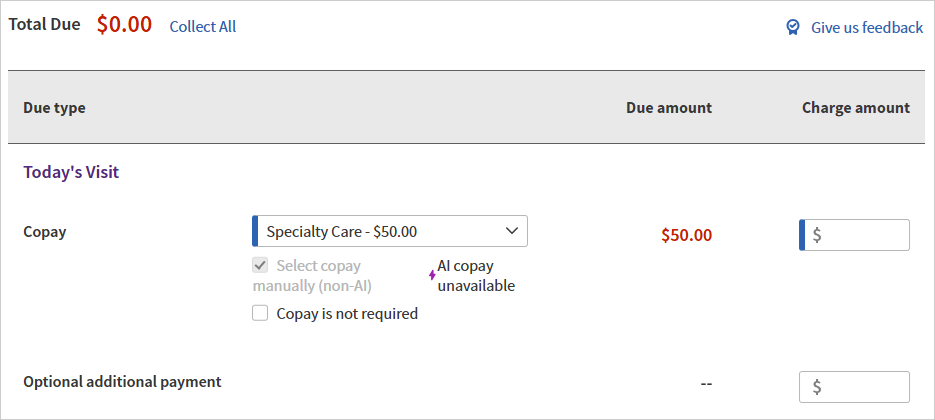
- If the AI-determined Copay amount is not available, you will automatically be in the legacy/non-AI workflow.
-
The Time of Service Collections reports reflect whether the copay was collected using the AI-determined Copay view or the legacy (non-AI) Copay view.
Setup
The Display AI copay by default Practice Setting is enabled for all customers by default.
- To help with change management, you can still go back to the legacy (non-AI) view to see the legacy (non-AI) copay from the Insurance Policy page if needed: Click Select copay manually (non-AI).
- If your organization or department prefers not to display the AI-determined Copay by default for any appointment, please contact your CSM or the CSC to turn off the Display AI copay by default setting. On the Main Menu, click Support > Success Community. In the Support Cases section, click Contact Client Support Center.
Features and workflows
Use the AI-determined Copay amount for improved accuracy of the Copay amount on the Check-in and Checkout pages, and patient-facing enhanced self check-in.
In the Today's Visit section:
| Legacy (non-AI) Copay | AI-Determined Copay |
|---|---|
The Copay amount was only for the Office Visit copay type and was based on a limited use of eligibility information. | The AI-determined Copay amount removes the concept of "copay type" and improves the accuracy of the copay amount for all appointments.
It determines Copay amount by evaluating the full appointment context in real time, including but not limited to:
Everything that copay types consider (such as specialty or place of service), the AI-determined Copay also considers — along with additional factors.
By evaluating all of these data points together, the AI-determined Copay is designed to provide a more accurate copay amount.
|
For any copay type other than Office Visit, you had to do the following:
Otherwise, the appointment wouldn't show a Copay amount.
| The AI-determined Copay amount reduces manual effort and reduces clicks. |
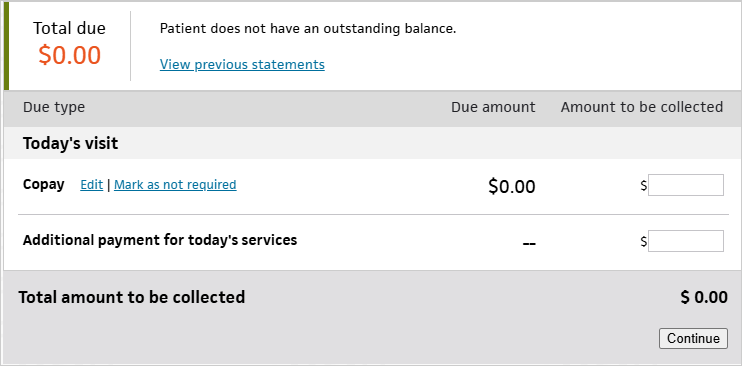
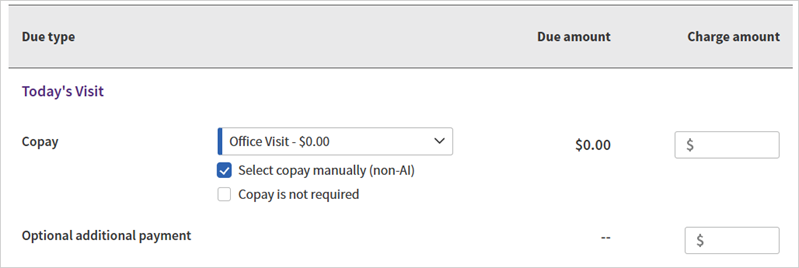
Legacy (non-AI) view:
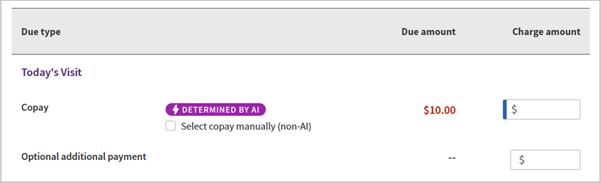
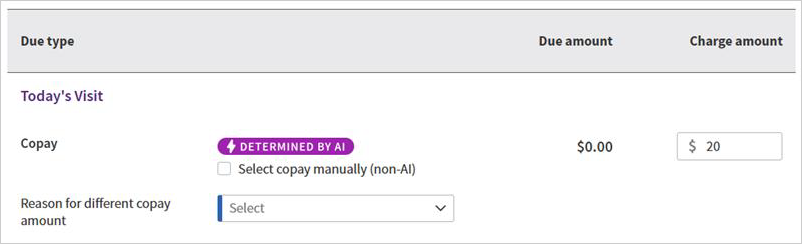
| (default view) AI-determined Copay amount:
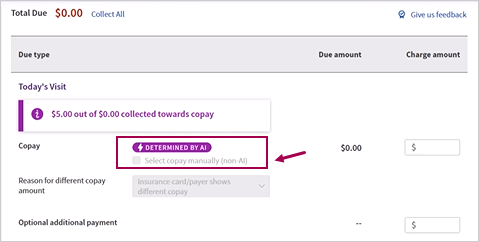
Note: The AI view appears by default only when the system has high confidence in the accuracy of the AI-determined Copay amount (that is, when the amount achieves a minimum precision threshold).
Tip: To help with change management, you can still go back to the legacy (non-AI) view to see the legacy (non-AI) copay from the Insurance Policy page if needed: Click Select copay manually (non-AI)
If you click Select copay manually (non-AI):
If the AI-determined Copay amount is not available, you will automatically be in the legacy/non-AI workflow.
|
Copay Due amount displayed based on the selected Copay type.
If you selected Mark as not required, the Due amount changed to $0.00.
| (default view) AI-determined Copay amount:
In this view, there is no field to mark the copay as not required. If the copay is not required, you can just collect $0.
If you click Select copay manually (non-AI) to go back to the legacy (non-AI) view:
|
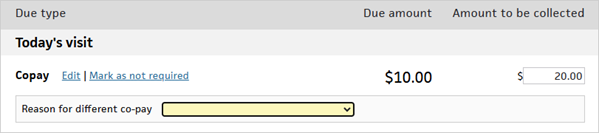
If you collect a different copay amount, you must select a Reason for different co-pay:
The options listed are:
| (default view) AI-determined Copay:
When the Charge Amount is different from the Due Amount, athenaOne will prompt you to provide a Reason for different copay amount.
The options listed are:
If you click Select copay manually (non-AI): The options listed are:
|
| Once the copay has been collected on the legacy/non-AI view and the payment is recorded, you cannot switch to the AI view for that visit. | Once the copay has been collected on the AI view and the payment is recorded, the AI view is locked and you will not be able to switch to the non-AI view for that visit.
|
Time of Service Collection reports
The following reports reflect whether the copay was collected using the AI-enabled Copay view or the legacy (non-AI) Copay view:
- Time of Service Collections report (Detailed view)
- Time of Service Collections - Cross Practice report (Detailed view)
| If the user collected Copay... | Report columns | |||
|---|---|---|---|---|
TOS Copay Owed | TOS Copay Collected | Copay Choice
(if the amount collected was different from the Copay amount) | Copay Type | |
| using the AI enabled Copay view | The AI-determined copay amount
| The copay collected using the AI -enabled Copay view | The Reason for different copay amount that was selected on the AI -enabled Copay view
Note: The Copay Choice will be one of the new Copay Choices, prefixed with "AI—"
| The Copay Type from the AI -enabled Copay view, prefixed with "AI—" |
using the legacy (non-AI) view
(click Select copay manually (non-AI) > go back to the non-AI view > collect the copay there) | The non-AI copay amount owed
| The copay collected using the non-AI view | The Reason for different co-pay that was selected on the non-AI view
Note: The Copay Choice will be one of the existing Copay Choices.
| The Copay Type that was selected on the non-AI view.
Note: The Copay Type will be one of the existing Copay Types.
|
There is no change to the Summary views of these reports, since the Copay reasons aren't surfaced at this level.
Frequently Asked Questions (FAQs)
Why are we introducing the AI-determined Copay amount?
We know many of you have been researching copays manually for years. You’ve checked insurance cards, reviewed eligibility details, and done everything you can to collect the right amount at check-in. That experience matters — and we respect the work that goes into it.
The AI-determined Copay isn’t here to replace your judgment. It’s here to support it.
Instead of relying on a single copay type or a manually entered amount, the AI-determined Copay looks at the full context of the visit — all at once.
- The AI model was trained on large volumes of appointment/payer/provider/eligibility data and finalized claims and is continuously evaluated against adjudicated EOB copay results.
- Most importantly, we only show an AI-determined Copay amount when the system has high confidence that the copay amount meets our accuracy standards. If it’s not confident, it won’t surface an AI-determined Copay amount, and instead, we show the legacy/non-AI copay from the Insurance Policy page.
The goal of AI-determined Copay is to help you collect accurate and timely copays at time of service, and help reduce:
-
Under-collection that leads to billing follow-ups
-
Over-collection that leads to refunds
-
Manual research time at the front desk
Over time, we evaluate the AI-determined copay amounts against adjudicated EOBs to ensure accuracy is maintained.
We appreciate the work you do every day to take care of patients and keep operations running smoothly. AI-determined Copay is meant to make that job easier.
Is the AI-determined Copay amount available on all athenaOne pages that display a copay?
- The AI-determined Copay amount is currently only on the Check-in and Checkout pages. If the Copay amount is AI-determined, you'll see the "DETERMINED BY AI" label.
- The Copay amount on other pages, such as Quickview or the Appointment page, is not yet AI-determined.
-
Patient-facing enhanced Self Check-In will display the AI-determined Copay amount if available. If the AI-determined Copay amount is unavailable, the legacy Copay amount will be displayed.
On the Check-in and Checkout pages, why don't I always see the AI-determined Copay amount?
If the AI Copay logic could not determine the copay amount, we will automatically display the legacy (non-AI ) view.
Why doesn’t the AI-determined copay match the copay shown on the Insurance Policy page?
The copays shown on the Insurance Policy page are based on copay types, which are primarily tied to provider specialty and, in some cases, place of service.
- For the Office Visit copay type, there is limited automation.
- For other copay types, the copay amount typically relies on manual entry in order to populate in the TOS payment section.
The AI-determined copay does not rely on copay types from the Insurance Policy page. Instead, it evaluates the full appointment context in real time, including appointment information, provider information, patient insurance (both primary and secondary if available), eligibility information, and more.
Everything that copay types consider (such as specialty or place of service), the AI-determined Copay also considers — along with additional factors. By evaluating these data points together, the AI-determined Copay is designed to provide a more accurate copay amount.
Why does the AI-determined Copay amount differ from what appears on an insurance card or what the patient paid previously?
It’s normal for copay responsibility to vary based on the specific details of an appointment.
For example:
-
An insurance card may list a standard copay amount, but certain visit types (such as preventive services, depending on payer rules) may result in a $0 copay.
-
Even for the same patient and provider, small differences in appointment type, place of service, specialist vs PCP, or payer configuration can result in a different copay outcome.
The AI-determined Copay is trained on historical appointment and adjudicated data and is continuously evaluated against finalized EOB results to ensure accuracy.
How do I return to my previous workflow (non-AI Copay)?
If you would like to view copays based on copay types from the Insurance Policy page for a given appointment, you can click the Select copay manually (non-AI) option on the Time-of-Service page.
If your organization or department prefers not to display the AI-determined Copay by default for any appointment, please contact your CSM or the CSC to turn off the Display AI copay by default department setting.
Is the AI-determined Copay amount available for family copay?
While the AI copay feature supports most family billing scenarios, it does not support family billing for family appointments that fit the following criteria:
- If your practice has the Family Billing Practice Setting enabled,
- AND if the patient has family members registered in athenaOne,
- AND if the family members have same day appointment as the patient,
There is no AI copay determination, and only the legacy Copay workflow is available.
What happens if I collect the Copay amount in multiple payments?
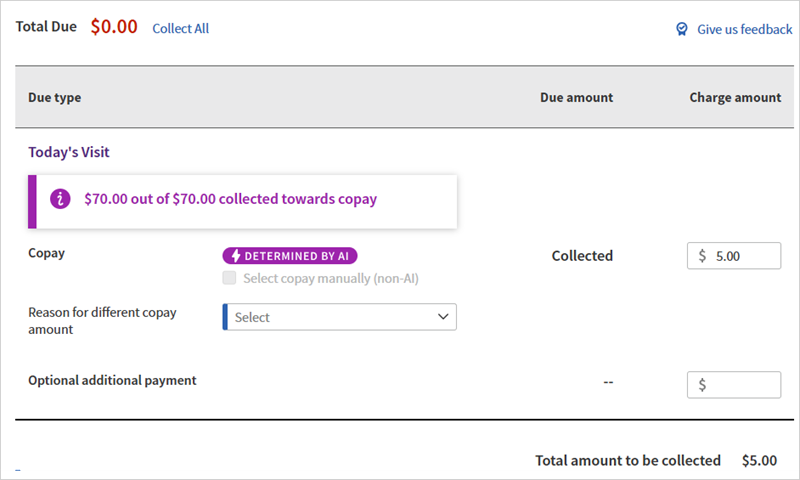
- The "collected toward copay" banner reflects the aggregated collection toward the original due amount.
- You must select a Reason for different copay amount whenever the aggregated collected total does not equal the original Copay due amount.
- The field disappears when aggregated collections equal the original due amount.
- The field appears when aggregated collections do not equal the original due amount (either less than or more than the original due amount).
In this example scenario, you collect the $70 copay in multiple payments:
| Copay Due | Copay Collected |
Description/ Image |
|---|---|---|
| Original Copay due: $70 | ||
| $70 |
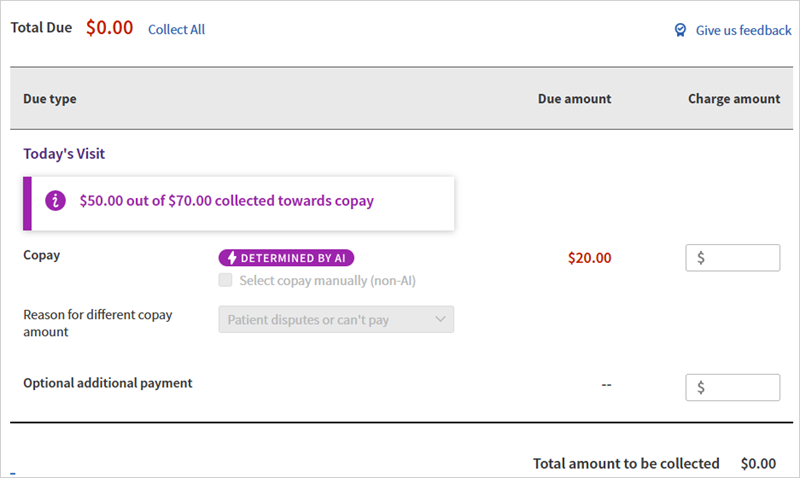
$50 |
Initial collection: you collect less than the Copay due
You must select a Reason for different copay amount because the aggregated collected total does not equal the original Copay due amount.
When you return to the page: Banner: "$50.00 out of $70.00 collected towards copay"
|
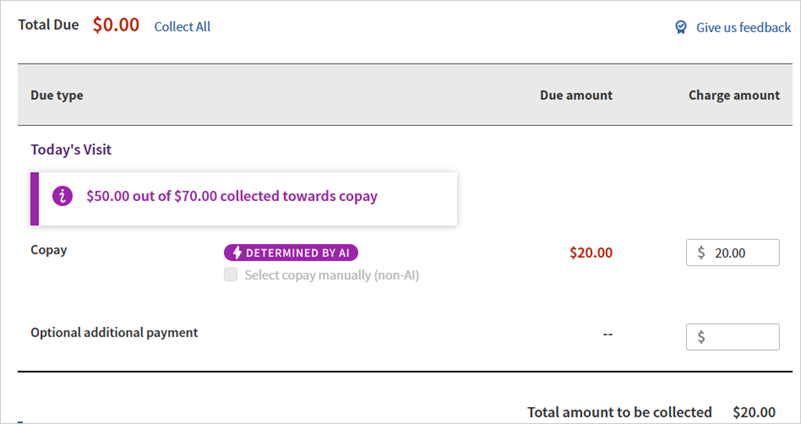
| $20 |
$20
|
Later: you collect the remaining amount due
When you return to the page: Banner: "$70.00 out of $70.00 collected towards copay"
|
| $5 |
Later: you collect more than the original copay due
|
|
|
After the overpayment is collected:
|